Using Charts and Figures in a UNICEF-Style Quarto Report
A second sample post with figure captions, data blocks, and report-oriented structure
Analytical UNICEF content often needs to combine narrative clarity with charts, figures, captions, and methodological transparency. This sample page shows one way to do that in a Quarto-native layout.
Why Visual Evidence Matters
In UNICEF-style reporting, figures should clarify rather than decorate. Each chart needs a clear title, a concise caption, and a visual hierarchy that keeps UNICEF Blue central without turning every chart into the same shape.
Use charts as evidence. Make the caption useful enough that a reader scanning quickly can still understand what the figure is showing.
Sample Figures
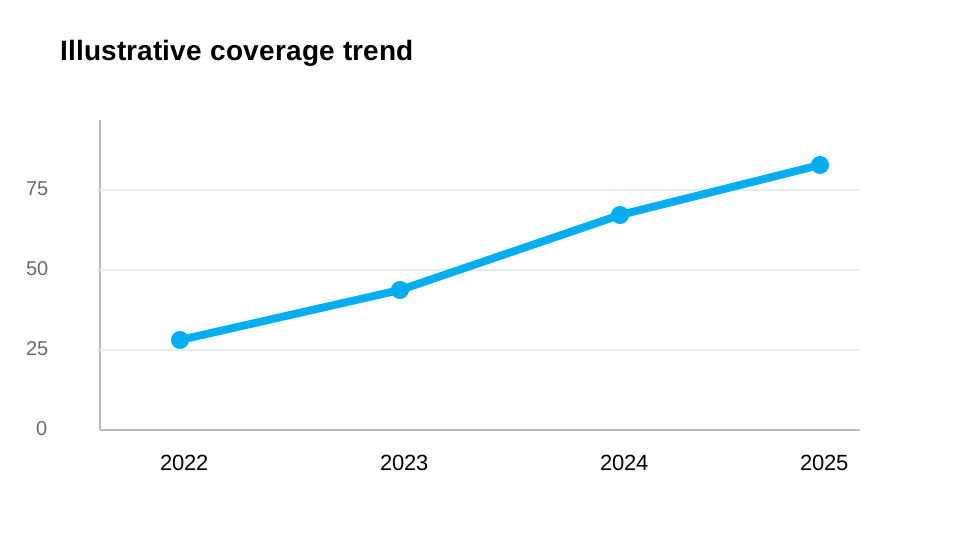
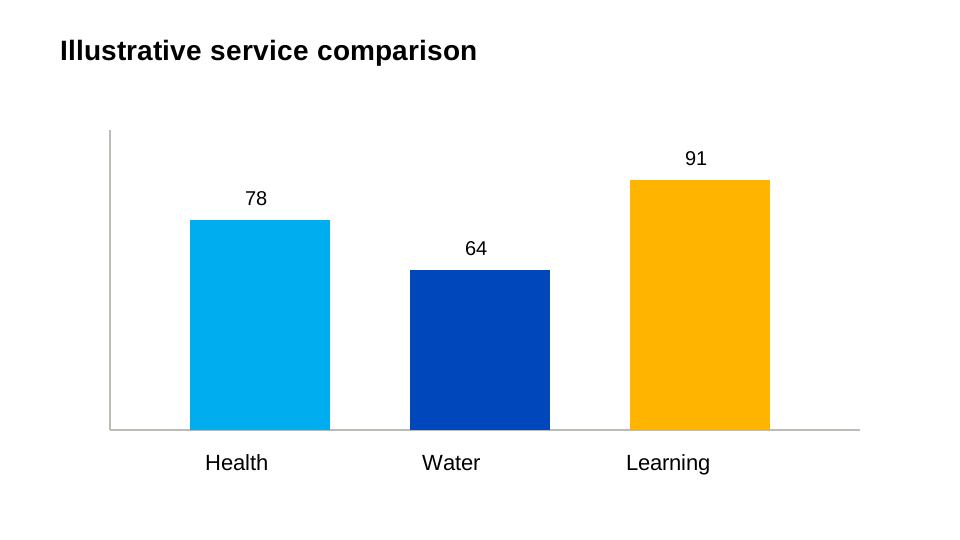
See Figure 1 for a simple trend view and Figure 2 for a category comparison.
Sample Data Table
| Programme area | 2024 value | Change vs. prior year |
|---|---|---|
| Vaccination outreach | 78 | +8 |
| Safe water access | 64 | +5 |
| Learning support | 59 | +11 |
The table above is intentionally compact. It complements the figures instead of repeating every detail from them.
Narrative Structure Around Figures
When combining prose and evidence:
- introduce the point before the chart appears
- keep captions short but concrete
- use callouts sparingly to frame interpretation
- do not overload one page with too many unrelated figure styles
Lead with the meaning, then show the chart, then return to the implication for children, communities, or delivery priorities.
Lightweight Figure Placeholder Pattern
When the final charts are not ready, use clearly labeled placeholders during drafting rather than decorative mock figures that could be mistaken for real data.
image: cover-data.svg
categories: [data, reports, quarto]
description: "A sample post demonstrating figures, chart placeholders, and analytical storytelling."
That keeps the listing experience coherent while leaving room for production assets later.